
 Get started
 Shopify discount not showing in the cart? 9 reasons and how to fix them
You created a discount, the shopper qualifies, and the cart still shows full price. Or two discounts should stack and only one applies. It’s rarely a bug: Shopify follows a handful of rules that the discount page doesn’t spell out. Here are the nine we see most.
Discount problems on Shopify are frustrating because nothing looks wrong. The discount is saved, the shopper qualifies, and the cart still shows full price. Or two offers should stack and the shopper only gets one.
In almost every case Shopify is doing exactly what its rules say. The rules just aren’t on the discount page. Go through these nine checks in order. Most problems are found in the first four.
1. The discount isn’t active
Open Discounts and look at the Status column. Scheduled means the start date hasn’t come yet, Expired means the end date has passed. Also check the time of the start date: it uses your store’s time zone, which may not be yours.
2. The cart doesn’t meet the requirements
Each discount has conditions, and every one of them must be true:
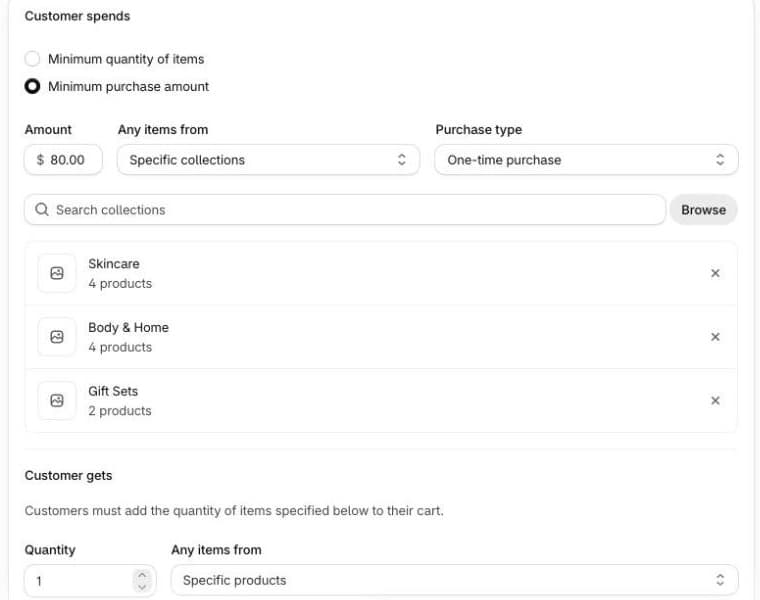
- Minimum purchase amount or quantity. Shopify only counts the products or collections you selected, not the whole cart. If a product isn’t in those collections, it doesn’t help the shopper qualify.
- Purchase type. A discount set to One-time purchase doesn’t apply to subscription items, and the other way round.
- Eligibility. A discount for specific customers or customer segments only applies when Shopify knows who the shopper is, so they have to be signed in.
- Sales channel. Automatic discounts are marked POS excluded by default. They won’t apply in your physical shop unless you tick Apply on POS Pro locations.
3. Another discount is winning
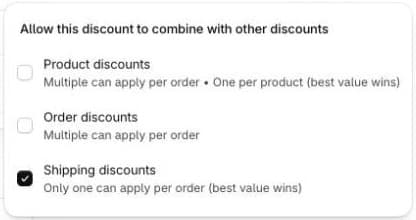
Shopify never combines discounts by default. When two discounts could apply and they aren’t allowed to combine, Shopify keeps only the one that gives the shopper the most and quietly drops the other. To the shopper, it simply looks like the second discount doesn’t work.
The fix is in each discount’s Combinations section. And the key detail is that both discounts must allow the combination. Ticking it on one of them isn’t enough.
4. Two product discounts on the same product
Even when two product discounts are allowed to combine, each product still gets only one of them. The menu says it in small print: “One per product (best value wins)”. So “20% off the Skincare collection” and “Buy 2, save 10%” on the same serum won’t add up to 30%. Two product discounts on different products in one cart do combine.
Only stores on Shopify Plus can stack product discounts on the same item, and both discounts have to name each other for it.
5. Buy X get Y: the gift isn’t in the cart
A Buy X get Y discount only discounts the Y product if the shopper puts it in the cart themselves. Shopify says so on the discount page: “Customers must add the quantity of items specified below to their cart.” Many shoppers don’t, and think the offer doesn’t work. Products in a Buy X get Y discount also can’t receive other product discounts, except on Shopify Plus.
Our guide on adding a free gift automatically shows one way around this.
6. The discount code is entered at checkout
Discount codes are usually entered at checkout, so the cart can’t show them yet. That’s expected. Automatic discounts are calculated in the cart, but whether the cart page or drawer shows the discount line depends on your theme. If your theme doesn’t show it, check at checkout before assuming the discount is broken.
7. You hit a Shopify limit
- 25 active automatic discounts. That count includes discounts created by apps. Past that, you can’t activate another one.
- 5 codes per order. A customer can use up to 5 product or order discount codes and 1 shipping discount code on one order.
- One shipping discount. Only one shipping discount applies per order, the best one.
8. The order isn’t placed in your online store
Shopify only combines discounts on orders from the Online Store, the Storefront API and Shopify POS. Checkouts inside Facebook, Instagram or Google don’t support combinations, so the shopper gets one discount at most.
9. The total isn’t what you expected
Sometimes the discounts do apply and only the maths surprises you. Shopify calculates in a fixed order:
- product discounts on each item,
- order discounts on the subtotal after product discounts,
- shipping discounts last.
Two percentage order discounts are both calculated on the same subtotal, so 10% and 5% give 15% off. A free shipping minimum also looks at the amount after product discounts, so a cart that was above the minimum before a discount can drop below it.
How Seny’s discount apps fit in
Seny’s offer apps, such as quantity discounts, bundles and BOGO, create automatic discounts in Shopify. You’ll see them under Discounts with the type Seny Discounts, and they count towards the 25 automatic discount limit. A few things are already handled for you:
- They combine with other product discounts and with shipping discounts by default, so a bundle offer and free shipping both apply.
- Two Seny offers never price the same product twice. If two of your offers cover the same item, the more specific one prices it, for example an offer for one product beats an offer for the whole store.
- The free shipping discount combines with product and order discounts, so free shipping isn’t lost when another offer applies.
- Discounts are only created or updated when you publish, so a draft you are trying out never changes prices at checkout.