
 Get started
 The EU withdrawal button on Shopify: what the rule asks for and how to set it up
Since 19 June 2026, online stores selling to EU consumers need a clearly labelled “withdraw from contract” function. Shopify’s return and cancellation rules cover part of it. Here’s what the rule asks for, what Shopify gives you and what to check yourself.
EU shoppers have long had 14 days to change their mind about most online purchases. What changed on 19 June 2026 is how easy that has to be. Directive (EU) 2023/2673 added a rule to the Consumer Rights Directive: if the contract was made online, the shopper must be able to withdraw online, in the same place, with an electronic withdrawal function.
It isn’t a new right and it doesn’t change refund rules. It’s a requirement about the button: withdrawing has to be as easy to find and use as buying was.
What the rule asks for
- A clear label. The function is labelled “Withdraw from contract here” or with equally unambiguous wording. A vague “Help” or “Contact us” link isn’t enough.
- Easy to find, for the whole withdrawal period. It has to be prominent on the store and available until the shopper’s withdrawal period ends.
- Two steps. First the shopper enters what identifies them and the order, such as name, order number and an email for the confirmation. Then they confirm with a second button, labelled “Confirm withdrawal” or similar.
- An automatic confirmation. The store sends a confirmation without delay on a durable medium, such as email, with the content of the withdrawal and the date and time it was sent.
- No hurdles. Summaries of the directive stress that a shopper shouldn’t have to create an account or sign in to use it.
Who it applies to: every online store that sells to consumers in the EU, wherever the store itself is based. B2B sales aren’t covered, and neither are products that have no withdrawal right in the first place, such as personalised or perishable goods.
What Shopify gives you
Shopify’s help article on the EU right of withdrawal says its return and cancellation rules can help meet the requirement. You’ll find them in Settings → Policies → Return and cancellation rules:
- Cancellation rules apply to items that haven’t been shipped yet. With them on, customers can cancel from their account themselves.
- Return rules apply to shipped items. You set the return window, when it starts (for example from delivery), return shipping and any restocking fee.
- Managed Markets. If you sell to the EU through Shopify’s Managed Markets, Shopify applies compliant cancellation and return policies to those orders automatically.
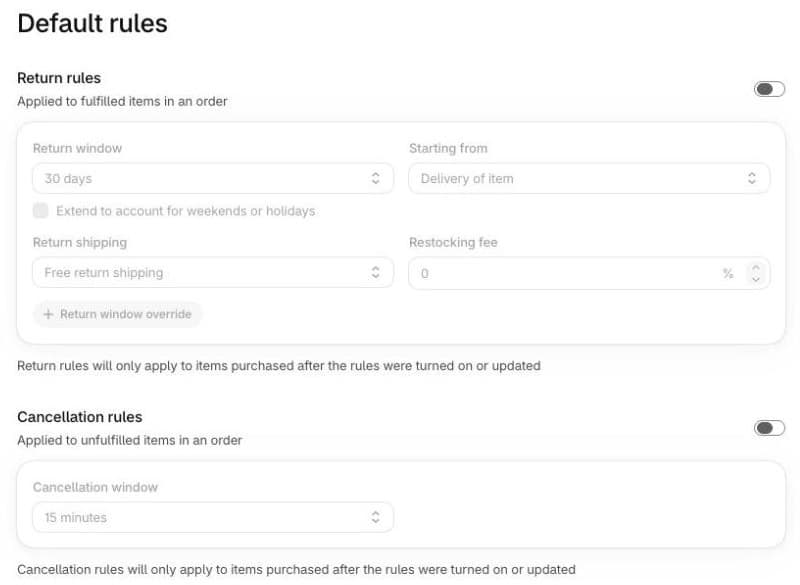
Note that both rules only apply to orders placed after you turn them on or change them.
Where Shopify’s rules may not be enough
Shopify’s self-serve returns and cancellations work through customer accounts, where the customer signs in with a code sent to their email. Check these points on your own store:
- Guest buyers and sign-in. Can someone who doesn’t want to sign in still withdraw? If the only way in is the account, consider a public option as well.
- The label. Is there a link anyone can see, worded clearly, such as “Withdraw from contract here”, and not only a “Return” button deep inside the account?
- The confirmation. Does the shopper automatically receive a confirmation that shows what they sent and the date and time?
- The window. Is the return window at least the legal 14 days, counted from delivery for goods?
A practical setup, step by step
- Turn on the rules. In Settings → Policies → Return and cancellation rules, switch on cancellation rules and return rules, with a return window of at least 14 days starting from delivery.
- Add a visible link. In Content → Menus, open the Footer menu and add a link named “Withdraw from contract here” that leads to a page explaining how to withdraw.
- Offer a way without signing in. On that page, link to the customer account for signed-in shoppers, plus a form that works without an account: it asks for name, order number and email, has a separate “Confirm withdrawal” button, and sends an automatic confirmation with the date and time. A plain contact form usually only emails you, not the shopper, so check this before relying on one. Several apps on the Shopify App Store were built for exactly this.
- Update your written policy. In Settings → Policies, update the Return and refund policy so it explains how to use the withdrawal function.
- Test it as a guest. Place a test order without an account, then withdraw from it and check the confirmation email.
Example: how Lithuania applies it
Each country writes the directive into its own law. In Lithuania the requirement applies from 19 June 2026 and is supervised by the State Consumer Rights Protection Authority (VVTAT). Lawyers from Sorainen, quoted by 15min, suggested the wording “Atsisakykite sutarties čia” for the button and “Patvirtinti sutarties atsisakymą” for the confirmation, and mentioned fines of €500 to €5,000. Shopify’s own article notes that some EU countries allow fines of up to 4% of annual turnover.
There’s another reason to get it right: when a shopper isn’t properly told how to withdraw, the withdrawal period can be extended by up to 12 months.
Common mistakes
- Only an email address. “Write to us to withdraw” isn’t an electronic withdrawal function.
- A button only behind sign-in. Shoppers who checked out as guests can’t reach it.
- No automatic confirmation. Without it the shopper has no proof of when they withdrew.
- A vague label. “Returns” or “Help” doesn’t clearly say that this is where you withdraw from the contract.
- Mixing withdrawal and refund. The button records the shopper’s decision. Your usual refund and return rules still apply after it.
- English-only wording. Label the button in the language your shoppers read.