
 Get started
The Shopify cookie banner for EU shoppers: setup, rules and the apps that ignore it
If you sell to people in the EU, analytics and marketing cookies need the shopper’s consent first. Shopify has a free built-in cookie banner that handles most of it. Here’s what the rules ask, how to set up the banner, and a five-minute test that shows whether your apps actually wait for the answer.
The EU’s ePrivacy rules say a website may only store or read information on a visitor’s device, such as cookies, with the visitor’s consent, unless it’s strictly necessary for something the visitor asked for. A cart, a login or a language choice don’t need consent. Analytics, ad pixels and personalisation do.
What a valid cookie banner looks like
Consent has to be a free, informed and active choice. The European Data Protection Board’s cookie banner taskforce, which brought national authorities together in 2023, described what most of them look for:
- A “Reject” option on the first screen, not hidden behind “Settings”. Most authorities consider a banner with only “Accept” a breach.
- No pre-ticked boxes. Optional categories start switched off.
- No tricks in the design. “Accept” must not be the only bright, big button while “Reject” is grey text or a small link.
- Nothing before the answer. Optional cookies are set only after the shopper accepts.
- A way to change your mind. Withdrawing consent must be as easy as giving it.
Shopify’s built-in cookie banner
Shopify’s own banner is free and already follows those points: Accept and Decline are equal buttons, and the preferences panel lists Personalization, Marketing and Analytics, all switched off until the shopper turns them on. It also passes the shopper’s choice to Shopify’s analytics, Shopify’s pixels and every app that listens to Shopify’s consent signal.
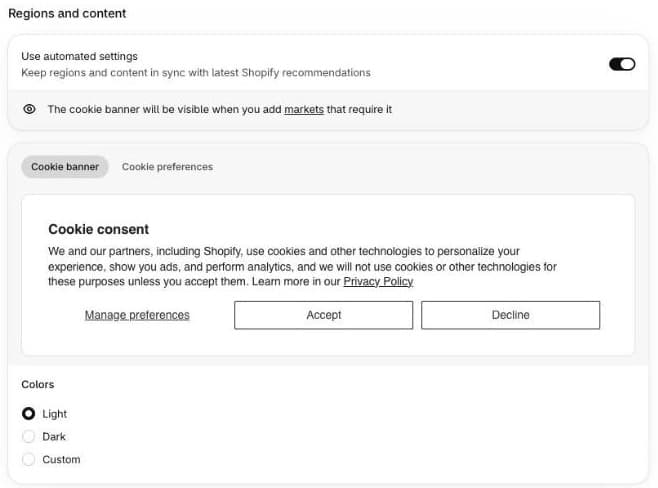
- Publish a privacy policy first under Settings, Policies. Shopify requires one before the banner can be used.
- Go to Settings, Customer privacy, Cookie banner.
- Leave Use automated settings on. Shopify then shows the banner to visitors from the EEA and the UK, as long as you have an active market there, and keeps the text in line with its recommendations.
- Choose the colours and the Position: centred, or along the bottom of the page.
- Decide whether to show the banner in checkout too. Shopify warns that it may reduce the checkout conversion rate.
- Click View under Position to see it on your store.
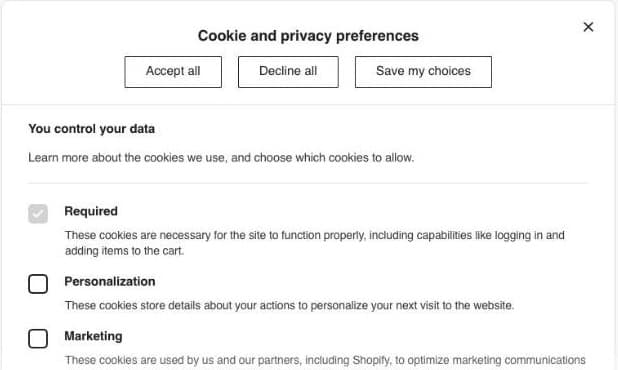
The banner is already translated into Lithuanian and the other languages Shopify supports for checkout. For other languages, translate it in the Translate & Adapt app.
Expect your analytics to drop
Once the banner is on, Shopify collects non-essential data only from shoppers who accept. Shopify itself warns that session counts and session-based numbers such as the conversion rate may go down. Your sales haven’t changed; you’re just seeing fewer of the visits behind them. Compare periods from before and after the banner with that in mind.
The five-minute test: do your apps wait?
The banner only controls tools that listen to Shopify’s consent signal (the Customer Privacy API). An app or a script pasted into your theme that doesn’t listen can set cookies before the shopper answers, and the banner can’t stop it.
- Open your store in a private browser window. Don’t click the banner.
- Open the browser’s developer tools (F12 in Chrome), go to Application, then Cookies, and select your store.
- Look for advertising and analytics cookies, such as `_fbp` (Meta) or `_ga` (Google Analytics).
- If they’re already there, something loaded before consent. Check recently added apps and any tracking code in your theme’s `theme.liquid`.
- Click Decline, reload, and check again: nothing new should appear.
Using a consent app instead
Some stores need more than Shopify’s banner, such as a detailed list of every cookie or blocking of scripts that ignore consent. If you install a consent app, pick one that integrates with Shopify’s Customer Privacy API, set the same regions in the app and in Shopify’s settings, and switch off Shopify’s banner so shoppers don’t see two.
Let shoppers change their mind
Shopify’s banner doesn’t add a link to reopen the preferences after the first choice. Most consent apps include one for your footer menu; with Shopify’s own banner, a small theme edit can add a footer link that opens the preferences panel again. Your privacy policy should also explain which cookies you use and how to withdraw consent.
How Seny handles consent
Seny’s apps set no cookies of their own. Their analytics, the views and clicks behind your Seny dashboard, waits for the shopper’s answer through Shopify’s consent signal: nothing is sent and no visit ID is created before the shopper allows analytics, and nothing is sent at all after a decline. The widgets themselves, such as a free shipping bar or a bundle offer, work either way, because showing an offer needs no consent.