
 Get started
The European Accessibility Act for Shopify stores: who it covers and what to fix
Since 28 June 2025 the EU expects online shops to work for people with disabilities: screen reader users, keyboard users, people who zoom or need clear contrast. Here’s who the law covers, who is exempt, what usually needs fixing in a Shopify store and how to publish the accessibility statement.
The European Accessibility Act (Directive (EU) 2019/882) has applied since 28 June 2025. Among the services it covers is e-commerce: any website where a consumer can place an order and so enter into a contract. In practice, that means most online shops selling to people in the EU, wherever the shop itself is based.
Who is exempt
Microenterprises that provide services are exempt from the accessibility requirements. A microenterprise has fewer than 10 employees and an annual turnover or balance sheet total of no more than €2 million. Many small Shopify stores fit that description.
Being exempt doesn’t mean accessibility doesn’t matter. Roughly one in four adults in the EU has some form of disability, and an accessible store is simply easier for everyone to buy from. If you’re growing past 10 people, it’s cheaper to fix things now than all at once later.
What the law asks of an online shop
- The store must be usable by people who can’t see the screen, can’t use a mouse, or need larger text and strong contrast. The benchmark is the European standard EN 301 549, which follows the WCAG guidelines at level AA.
- Identification, security and payment must be accessible, including the checkout.
- Accessibility information about the products you sell must be passed on when the manufacturer provides it.
- You must publish information explaining how your service meets the requirements, usually as an accessibility statement, and keep it up to date.
What Shopify covers, and what is yours
Shopify says it covers its own e-commerce services under the act and tests its checkout against WCAG 2.2 level AA. That is a good start, because payment is the part of the store you can change least. Everything before checkout is yours: your theme, the apps you add and the content you write. Shopify notes that merchants have full control over their theme code, so it can’t vouch for it.
What usually needs fixing in a Shopify store
- Image descriptions. Every product image needs alt text that says what it shows. Add it in the product’s Media section.
- Contrast. Light grey text on white, or white text on a pale photo, is hard to read. Check your theme’s colour settings.
- Keyboard use. Press Tab through your home page, a product page and the cart. You should always see where you are, and reach and use every button, menu and option.
- Popups and drawers. They must be closable with the keyboard, for example with the Escape key, and must not trap the shopper.
- Colour as the only signal. A size shown as sold out only by turning grey needs a text label too.
- Videos. Product videos with speech need captions.
- Headings and links. Use real headings in your pages, and link text that says where it goes, not “click here”.
How to publish your accessibility statement
The act requires information on how your service meets the requirements: a general description of the service, what’s needed to understand how it works, and how it meets the accessibility requirements. Most stores publish it as a page:
- Go to Online Store, Pages, and add a page called “Accessibility statement”.
- Say which standard you aim for, what you’ve checked, any known issues and when you plan to fix them, and how shoppers can contact you if something doesn’t work for them.
- Set it to Visible and save.
- Add it to your footer menu under Content, Menus, and mention it in your terms of service.
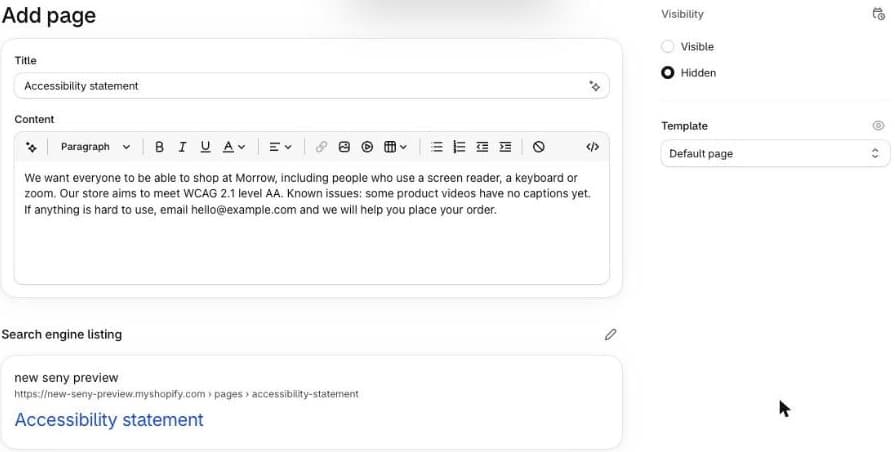
Be honest in it. Claiming full compliance you haven’t checked is worse than listing what you’re still working on.
Who checks, and what happens
Each country has a market surveillance authority that can ask you to fix problems and, if you don’t, fine you. Amounts differ by country: Germany’s law, for example, allows fines of up to €100,000. In Lithuania the State Consumer Rights Protection Authority (VVTAT) is responsible for market surveillance under the law.
Seny’s apps
If you add Seny’s apps to your store, a few things are already handled. Popups and drawers, such as the upsell popup and the wishlist, close with the Escape key. Apps with animation respect the shopper’s “reduce motion” setting. Every text a screen reader reads out, including labels that aren’t visible on screen, is a setting you can change and translate. Test them with the keyboard like any other part of your store.
Common mistakes
- Assuming Shopify covers everything. It covers checkout. Your theme, apps and content are yours.
- Relying on a toolbar app instead of fixing the theme.
- Product images with no alt text, or the file name as alt text.
- A statement that claims full compliance without having tested anything.
- Forgetting the apps. Every popup, bar and widget you add is part of your store and has to work with the keyboard.